Practical guides · Performance
Liberty Weblab
Google Page Experience guide: Core Web Vitals and what to fix first
A practical map of LCP, INP, and CLS—plus HTTPS and mobile usability—so you improve real-user experience for SEO and conversions, not just lab scores.
Page experience is how people feel your site—not a vanity score
Google’s page experience signals reward pages that load the main content quickly, respond to input without lag, and stay visually stable. Those same traits also protect paid media efficiency and conversion rate. This guide explains what to measure, what usually breaks, and how to prioritize fixes with technical SEO and web teams.
Use field data (real users) as the source of truth. Lab tools are for diagnosis—not the finish line.
-
Speed that matters LCP: how fast the main content becomes visible.
-
Responsive input INP: how quickly the page reacts to taps and clicks.
-
Visual stability CLS: stop layout shifts that cause mis-taps.
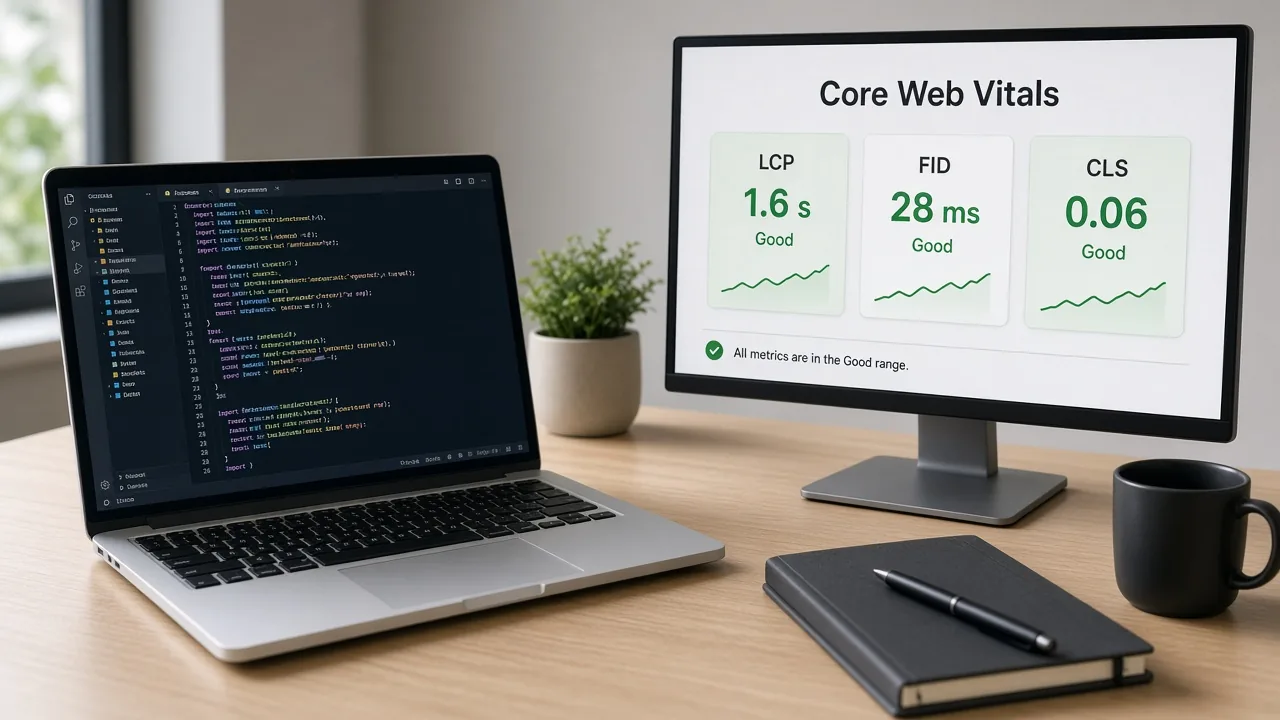
Core Web Vitals
The three metrics that drive most page-experience work
Prioritize the vital that is “Poor” for the most traffic on your key templates—homepage, category, product, and lead pages.
-
LCP
Largest Contentful Paint — main content visibility speed.
-
INP
Interaction to Next Paint — responsiveness to user input.
-
CLS
Cumulative Layout Shift — unexpected movement of content.
-
HTTPS
Secure delivery — baseline trust and modern browser features.
-
Mobile UX
Usable layouts, tap targets, and readable text on small screens.
Deep dive
What each signal means—and what usually fixes it
Largest Contentful Paint
LCP measures when the largest visible element (often a hero image, heading block, or product media) finishes rendering. Slow LCP feels like “the page is still loading” even if chrome appears early.
Common causes: oversized hero images, late server responses, render-blocking CSS/JS, and lazy-loading the LCP element by mistake. Fixes usually start with image compression/formats, CDN caching, critical CSS, and ensuring the LCP asset is discoverable early.
Aim: Good field LCP on money templates—not only a green Lighthouse screenshot.
Interaction to Next Paint
INP captures how long it takes for the page to respond visually after taps, clicks, and key presses. Long tasks from heavy JavaScript, third-party tags, and main-thread contention are typical culprits.
Prioritize tag hygiene, defer non-critical scripts, break up long tasks, and test menus, filters, and forms on mobile. INP problems often show up as “the button did nothing” moments that kill conversions.
Aim: Smooth interactions on nav, filters, add-to-cart, and lead forms.
Cumulative Layout Shift
CLS rises when content jumps—ads, embeds, webfonts, or images without reserved space. Users mis-tap and bounce; paid traffic feels especially expensive.
Reserve dimensions for media and embeds, avoid inserting banners above existing content, and stabilize font loading. Cookie and promo bars should not shove the LCP element after first paint.
Aim: Stable layouts on product, article, and landing templates.
HTTPS and mobile usability
HTTPS is table stakes for trust and modern APIs. Mixed content and broken certificates still appear on migrations and staging leftovers—catch them in crawl QA.
Mobile usability covers readable text, adequate tap targets, and no horizontal scrolling. A “desktop-first” redesign that fails thumbs-first navigation will tank experience even with decent lab scores.
Aim: Secure, thumb-friendly money paths on real devices.
How to decide what to fix first
Start with templates that carry revenue or lead volume. Use CrUX / Search Console field reports to see which vital is failing for the most users. Then open lab tools to reproduce the cause on that URL pattern.
Coordinate SEO, developers, and media buyers: a slow landing page can erase PPC gains overnight. Pair experience work with landing page optimization when message match and speed both lag.
Rule: Fix the vital that hurts the busiest templates—then re-measure field data before celebrating.
90-day rhythm
A practical improvement sequence
Page experience work compounds when it is treated as a program—not a one-time Lighthouse cleanup before a launch.
-
Days 1–14
Baseline & triage
Pull field data, list failing templates, and assign owners for LCP / INP / CLS themes.
-
Days 15–45
Ship high-impact fixes
Hero media, critical CSS/JS, tag debt, and layout reservations on money URLs.
-
Days 46–90
Hardening & monitoring
Regression checks on releases, third-party budgets, and monthly field-data review.
Checklist
Page experience checklist before you scale ads
If these fail on your primary landing URLs, fix experience before raising spend.
- Field LCP is Good (or improving) on key templates
- INP issues reviewed on forms, menus, and filters
- Images and embeds reserve space (CLS controlled)
- HTTPS clean—no mixed-content warnings on money pages
- Mobile tap targets and text pass real-device checks
- Third-party scripts have owners and a performance budget
From scores to a fix plan
Need a page experience plan tied to SEO and conversions?
Request a free proposal—we will triage Core Web Vitals on your money templates and sequence fixes with your developers.